
Same product, new artwork
How to duplicate a Printify product with a new design
Yes: duplicate the product, change the artwork on the copy, then publish the copy under a new name. In Printify, click the Duplicate icon on the product in My Products, then replace the design on the copy in the Product Creator. Give the copy its own title, description and tags before you publish it. The original product and its listing stay as they are.
Updated
In Printify
How do I duplicate a Printify product and change the artwork?
These steps come from Printify's own duplicate article and its article on editing an existing product, both checked September 27, 2026.
- Duplicate. In My Products, click the Duplicate icon on the product. Printify says the copy keeps the variants, pricing, descriptions, mockups and Print Provider settings.
- Replace the design. Click the paintbrush icon on the copy to open it in the Product Creator. Swap in the new design, check its size and position, and click Save product.
- Rewrite the listing. Click the copy to open its details. Give it a new title and tags. Replace the description too, since it came over from the original and describes the old design.
- Check the main mockup. In the same details view, select the mockup buyers should see first.
- Publish. Click Publish. The copy goes to your store as its own listing.
None of this touches the original, so there is nothing to relist. Make the changes in Printify rather than on Etsy or Shopify. Printify warns that editing product information on the sales channel can interfere with order import.
Many designs
What if I have 20 new designs for the same product?
You swap the design and rewrite the listing 20 times, once per copy. Publishing is the exception: Printify documents selecting several products in My Products and choosing Publish once.
Printify documents bulk actions for products that already exist, such as replacing the print provider on many products. Its duplicate article describes no way to put one product onto many new designs in one pass (checked September 27, 2026).
The repetition is where mistakes get in. A copy you forget to rewrite goes live with the original's description, describing a design it does not carry.
In Productify
How do I put many new designs on one product setup?
Clone the product once, then add the designs. Productify reads the product from your Printify shop, and each new file becomes its own proposed product with that setup.
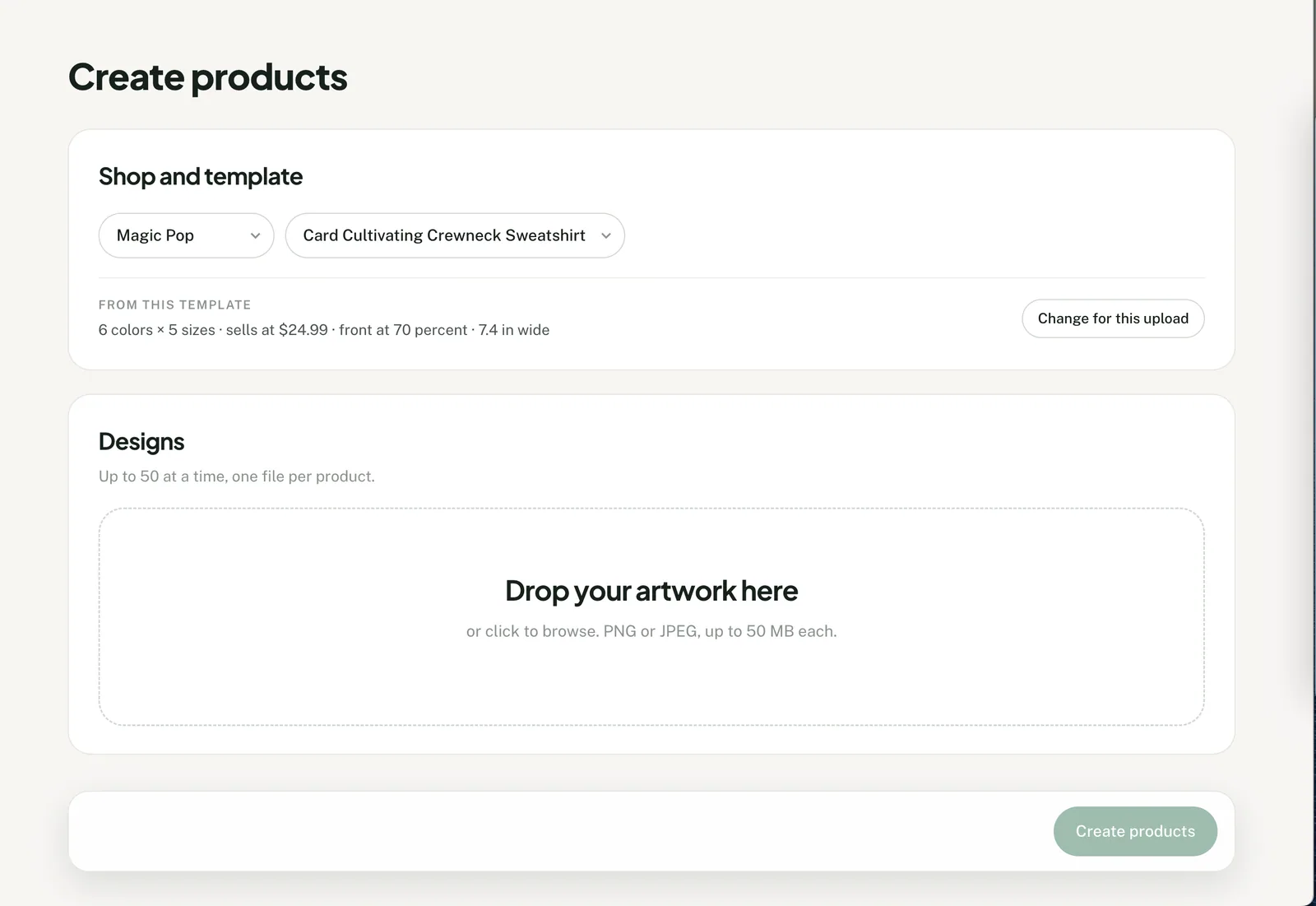
- Clone the product. Connect the Printify shop that holds it. In Products, open Shop catalog and choose Clone on that product. Create products opens with it as the template.
- Check what it inherited. The line under the template shows the colors and sizes, the price and the placement. Change for this upload adjusts any of them for this batch only.
- Add the designs. Up to 50 PNG or JPEG files, each up to 50 MB. Each file becomes one proposed product.
- Choose how listings are written. Write it for me, the default, gives each design its own title, description and tags, written from that artwork. Titles can also come from the file name or be typed. Tags you add go on every product. Etsy allows 13 per listing, 20 characters each.
- Review, then create. Check each proposed product's title, description, tags, price and placement, and edit any of them. Approve and create makes the products in the selected Printify shop, unpublished.
- Publish when ready. Use Publish to store in Products, or publish in Printify. Either way it goes through Printify's own connection to that shop's sales channel.
Artwork reaches Printify's media library while you set up the batch. No Printify product exists until you approve the reviewed batch.
What carries over
What does a clone keep from the original product?
The blank, the colors and sizes, one price and the placement. It leaves behind the old artwork, title and tags.
| Part of the original | In each new product |
|---|---|
| Blank and print provider | The same. A different blank or provider needs its own setup and upload. |
| Colors and sizes | The original's enabled colors and sizes. |
| Price | The original's most common retail price, as one fixed price on every color and size. |
| Placement | The print area, position, scale and angle of the original's artwork. Where it prints on several areas, only the first one Printify lists is used. |
| Description | Offered as Reuse the template's. Off unless you choose it, since it describes the old design. |
| Artwork | Replaced by the new design. |
| Prints on other areas | Not carried. A sleeve, neck or back print on the original is left off. |
| Different prices by size | Not carried. A higher 2XL price becomes the common price. |
| Title and tags | Not carried. Written per design, taken from the file name, or typed. |
| Mockups | Not carried. Printify makes new mockups for each product. |
The original product is not modified, moved or republished. For prices that rise with size, set a fixed profit or a markup under Change for this upload. Those build each variant's price from its blank cost when Printify returns one.
Where Productify fits
When is Printify's Duplicate the better choice?
- For one or two new designs. Duplicate needs no second tool and no upload.
- When the original prints on more than one area and those prints must stay, such as a sleeve logo. A Printify duplicate starts as a copy of the product; a Productify clone copies only its first design's print area.
- When prices differ by size and must stay exactly as they are.
- When the goal is the same products in another of your Printify stores. That is Printify's Copy to other store. A Productify batch goes to one selected shop.
- For all-over print products, which Productify does not support.
Productify fits when one product needs many new designs, each with its own listing, reviewed before anything is created. To reuse the setup later, save it as a Printify product template. The full template workflow is in how to bulk upload to Printify with a template. Productify is independent and is not affiliated with Printify.
Official Printify references
- How do I duplicate products in Printify?
- How can I edit an existing product?
- How do I create a single product with different designs?
- Migration Tool for Shopify, Etsy, and TikTok Users
- How can I create a Multi-Product Listing on Etsy?
- Replacing the Print Provider for multiple products
Sources checked September 27, 2026.
Questions
Duplicating Printify products FAQ
Can I put the same design on different products?
Yes, with one upload per product setup. Productify puts many designs on one setup, not one design on many setups. So one design on a tee, a hoodie and a mug is three uploads, one per product. On Etsy, Printify's Multi-Product Listing can then show the tee and the hoodie as one listing.
Can one listing hold several designs instead?
For color variants, yes. Printify's Make a specific design puts different artwork on chosen colors of one product, such as a light print for dark shirts. On Etsy, Printify's Multi-Product Listing combines several Printify products, such as a tee and a hoodie, into one listing. For Shopify and TikTok, Printify's Migration Tool links separate products to one listing.
Can I copy a product to another Printify store?
Yes, in Printify. Select the products in My Products, then choose More actions and Copy to other store. Printify says copying can take a few hours, and the copies must then be published by hand.
Can I copy the listing in Etsy or Shopify instead?
Not as a way to make a new Printify product. Printify fulfills a listing through the Printify product behind it, and a copy made in Etsy or Shopify has none. Printify's Migration Tool can link such a listing to a Printify product afterward.
Can I save the setup for the next batch?
Yes. Open the product in Productify's Products and choose Save as template. A saved template belongs to the shop it was saved in, and the next upload there can start from it.
For one design across several garments, see the team logo hoodies example. It puts 15 player files on one hoodie setup, then repeats them on each other garment. Printify's steps for several designs in one product cover the light-and-dark case.
Clone the product that already sells.
Add up to 50 new designs and review each proposed product before anything is created in Printify.